Beam (TryBeam) is an all-in-one construction management and financial software designed to help contractors manage estimating, projects, payments, and compliance from a single dashboard.
It is especially popular among small to mid-sized construction companies, remodelers, and contractors who want to replace spreadsheets and manual processes with automation and AI tools.
What Is TryBeam?
TryBeam is the official platform behind Beam software. It provides:
- AI-powered estimating
- Project management tools
- Financial tracking (job costing, invoicing)
- CRM (customer and lead management)
- Compliance and document handling
The goal is simple: save time, reduce errors, and increase profits by centralizing everything in one system.
Key Features of TryBeam
1. AI-Powered Estimating
Beam uses AI to help contractors create estimates faster by analyzing:
- Plans and drawings
- Scope of work
- Site notes
It can draft and edit estimates automatically, reducing manual effort and improving accuracy.
2. Centralized Dashboard
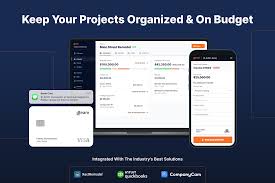
TryBeam offers a single dashboard where you can:
- Track projects
- Monitor costs vs budget
- View invoices and payments
- Manage leads and proposals
This eliminates the need for multiple tools or spreadsheets.
3. Job Costing & Financial Management
Beam connects estimating directly with budgeting and job costing, so you can:
- Track real-time project profitability
- Compare estimated vs actual costs
- Manage expenses and payments
This helps prevent cost overruns and improves decision-making.
4. Invoicing & Payments
With TryBeam, contractors can:
- Send invoices online
- Accept payments (ACH or card)
- Track unpaid bills
- Manage subcontractor payments
It also integrates with tools like QuickBooks for accounting.
5. CRM & Sales Pipeline
Beam includes a built-in CRM to:
- Track leads and clients
- Monitor estimate status
- Follow up automatically
- Manage communication in one place
This helps contractors win more jobs.
6. Compliance & Documentation
TryBeam simplifies compliance by managing:
- Lien waivers
- W9s and insurance documents
- Change orders
- Contracts and approvals
Everything is stored and tracked digitally.
Who Should Use TryBeam?
TryBeam is ideal for:
- Residential contractors
- Remodelers
- General contractors
- Estimators
- Small to mid-sized construction businesses
It’s built specifically for teams that want automation without complex enterprise software.
Pricing (Overview)
TryBeam offers flexible pricing plans:
- Free Plan – Basic features + limited AI usage
- Paid Plans – Start around $250/month and scale up
- Enterprise – Custom pricing
The free plan includes estimating, invoicing, and basic project tools, making it easy to test before upgrading.
Main Benefits of TryBeam
- Saves time with automation
- Reduces errors in estimating
- Improves cash flow with faster payments
- Centralizes operations in one dashboard
- Boosts profitability through real-time insights
Why TryBeam Stands Out
Unlike traditional construction software, Beam connects:
Estimating → Budgeting → Job Costing → Payments
This means no duplicate data entry and a smoother workflow across your entire business.
Conclusion
TryBeam (Beam Construction Software) is a powerful, modern solution for contractors who want to streamline their operations. With AI-driven estimating, financial tracking, and a centralized dashboard, it helps construction businesses work faster, smarter, and more profitably.