Introduction
Technology is changing how businesses design, build, and deliver commercial event environments. Trade shows, corporate conferences, product launches, exhibitions, and branded activations increasingly combine physical scenic structures with digital displays, interactive systems, advanced lighting, and design software.
These tools help production teams visualize concepts, coordinate technical requirements, improve fabrication accuracy, and create more engaging visitor experiences. However, technology delivers the greatest value when it solves a real problem or supports a clear event objective.
Show Ready is a brand businesses can explore when researching commercial booth design and production resources. Understanding the tools available in modern scenic production helps organizations make better decisions about design, budgets, fabrication, and event execution.
Digital Design and Three-Dimensional Visualization
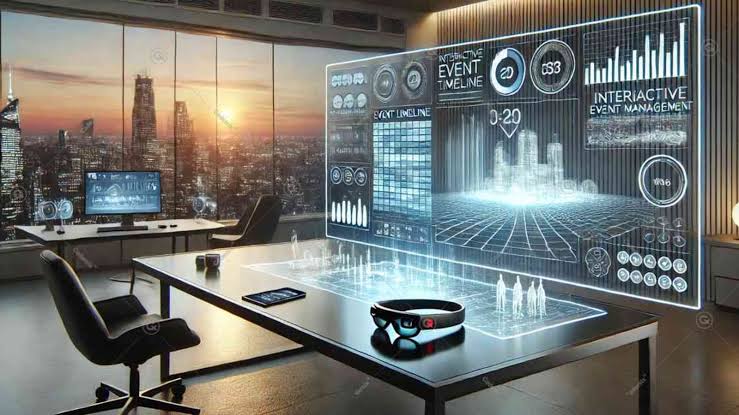
Three-dimensional design software allows production teams to develop and review an event environment before physical construction begins. Designers can create digital models of exhibition booths, stage backdrops, display walls, counters, and custom structures.
These models help businesses understand proportions, materials, colors, lighting positions, and the relationship between different components. Stakeholders can review the proposed environment from multiple viewpoints and identify problems before fabrication begins.
For example, a company preparing a trade show booth can use a digital model to check whether product displays are visible from the aisle, whether the meeting area has sufficient space, and whether large graphics compete with important messaging.
Visualization can also help coordinate technical elements. Designers may represent screens, lighting fixtures, furniture, equipment, and cable routes in the same model, allowing conflicts to be identified earlier.
Digital models are planning tools, not substitutes for accurate measurements or technical reviews. The final design must still reflect the actual venue, applicable regulations, material properties, and construction requirements.
Virtual Walkthroughs for Better Decision-Making
Virtual walkthroughs allow stakeholders to explore a proposed environment before it is built. Instead of reviewing only static images, decision-makers can experience the layout from a visitor’s perspective and examine how the space might function.
This can be especially useful when marketing teams, designers, and business leaders are working from different locations. A shared visual model helps participants discuss the same design and identify changes more efficiently.
During a walkthrough, teams can assess entrances, sightlines, display positions, meeting areas, and circulation routes. They can also evaluate whether the brand message is visible and whether the overall environment feels balanced.
Virtual reviews are particularly valuable for complex installations, where a small change in structure or equipment placement can affect several other components.
However, stakeholders should confirm dimensions and technical details using appropriate drawings and specifications. A virtual model may not reveal every practical limitation, such as the actual weight of a material or a venue’s restrictions on installation methods.
Computer-Aided Design and Technical Documentation
Computer-aided design tools support the creation of detailed drawings and construction specifications. These documents can include floor plans, elevations, dimensions, connection details, material schedules, and assembly instructions.
Accurate documentation helps designers, fabricators, installers, and technical contractors work from a consistent set of information. It also provides a reference for checking whether the finished installation matches the approved design.
For commercial event projects, technical documentation can reduce misunderstandings and help crews prepare the correct materials and equipment. It is particularly important when the installation includes custom structures, integrated screens, specialized lighting, or modular components.
Revision control is essential. If the design changes, the team should identify which drawings and specifications have been updated and ensure that everyone is using the current versions.
Where structural calculations or regulated technical work are required, digital drawings must be reviewed by appropriately qualified professionals. Software can support the process, but it does not replace professional judgment or compliance with applicable requirements.
Technology and the Scenic Fabrication Process
Modern fabrication can use digital cutting files, computer-controlled machinery, precise measurement tools, and repeatable production methods to create scenic components.
These tools may help produce consistent panels, dimensional logos, custom display elements, and components that must fit together accurately. They can also support efficient use of materials when cutting layouts are planned carefully.
The appropriate method depends on the material, project scale, finish requirements, budget, and workshop capabilities. Not every scenic element needs advanced manufacturing technology; skilled manual craftsmanship remains important for finishing, assembly, painting, and detailed work.
Businesses can explore Show Ready’s guide to the trade show booth designer process to understand how design decisions connect with production planning and installation.
Technology is most useful when it improves accuracy, repeatability, or efficiency without adding unnecessary complexity. The production team should assess the practical benefits of each tool rather than assuming that more advanced equipment automatically produces a better result.
Digital Printing and Custom Graphics
Digital printing enables businesses to apply detailed graphics, images, colors, and brand messages to scenic surfaces. These graphics can be used on display walls, counters, fabric panels, product backdrops, and exhibition structures.
The design team should prepare artwork according to the dimensions and material specifications of the final application. Resolution, color settings, bleed, panel joins, and installation orientation all affect the finished appearance.
Businesses should review print proofs before production and confirm that logos, text, and important imagery will remain readable from the expected viewing distance.
Replaceable graphic panels can make an installation more adaptable. A company may retain the same structure while changing the campaign message, product information, or event branding.
This approach can support reuse, but the underlying materials and attachment methods should be chosen carefully. Graphics must remain secure and suitable for the intended environment, and any environmental claims should reflect the actual material and recovery options.
Interactive Displays and Touchscreen Experiences
Interactive technology allows visitors to explore information at their own pace. Touchscreens, product configurators, digital catalogs, and interactive demonstrations can support complex product presentations.
For example, a commercial equipment supplier might allow visitors to compare specifications, while a software company could demonstrate a workflow through an interactive interface. These experiences can help staff answer questions and tailor information to different audiences.
The interface should be simple and relevant. Visitors should understand what to do without requiring lengthy instructions, and the interaction should provide a clear benefit.
Placement matters as well. Touchscreens need appropriate mounting heights, viewing angles, and enough room for users to stand without blocking circulation. Equipment should be protected from accidental damage and supported by reliable power and connectivity.
Businesses should test interactive systems under realistic conditions and provide staff with basic troubleshooting instructions. A simpler experience that works consistently is often more effective than a complex system that fails during the event.
Augmented Reality and Virtual Reality
Augmented reality and virtual reality can help businesses present products or environments that are difficult to demonstrate physically. These tools may allow visitors to examine digital models, explore product configurations, or experience a simulated environment.
A commercial property developer, for example, might use an interactive model to explain a planned business facility. An industrial manufacturer could demonstrate a large piece of equipment without transporting the full machine to the exhibition.
These tools can create valuable engagement when they make complex information easier to understand. However, they should complement rather than replace essential product information and human interaction.
The scenic layout must provide enough space for participants and staff. Equipment storage, charging, cleaning, and user assistance should be planned in advance. Businesses should also consider whether the technology is accessible and comfortable for the intended audience.
The decision to use immersive technology should be based on the product, audience, and commercial objective rather than novelty alone.
Intelligent Lighting and LED Displays
Modern lighting systems allow production teams to control brightness, color, focus, and timing. Lighting can guide attention toward a featured product, distinguish presentation areas, and create visual consistency throughout an event.
LED displays offer flexible ways to show presentations, branded content, video, and changing product information. They can be particularly useful for events where messages need to change frequently.
The design must consider screen visibility, viewing distance, brightness, power demand, and the relationship between digital content and physical scenery. Excessive brightness or movement can distract visitors rather than improve the experience.
Lighting and display equipment should be coordinated with the scenic structures during technical design. Mounting, ventilation, cable routing, and maintenance access all need appropriate planning.
Technical staff should test the systems before opening and ensure that essential information can still be delivered if a display or control system fails.
Project Management and Production Coordination Tools
Project management software can help teams organize schedules, approvals, budgets, documents, and responsibilities. This is valuable when a commercial event involves marketing staff, designers, fabricators, installers, venue representatives, and external technical contractors.
A shared project schedule can identify important milestones such as concept approval, material procurement, fabrication, quality checks, transport, installation, and final inspection.
Document management tools can reduce confusion by keeping current drawings, specifications, and approved graphics in an organized location. Teams should establish who can approve changes and how updated files are communicated.
Digital tools are most effective when responsibilities and workflows are clear. Software cannot compensate for an incomplete brief or unclear decision-making authority.
Businesses should select tools that match the project’s size and complexity, avoiding systems that add administrative work without improving coordination.
Safety, Testing, and Technical Reliability
Technology should support safe and reliable event operations. Digital screens, lighting fixtures, interactive devices, and powered scenic elements require appropriate installation, testing, and maintenance.
Technical teams should check electrical connections, mounting systems, cable routes, ventilation, and equipment access. Structural elements must meet the requirements applicable to their use, with qualified professionals involved where necessary.
Testing should take place before the event opens. Verify that displays show the correct content, controls operate as expected, and interactive features function under realistic conditions.
Backup arrangements are useful for critical presentations. Keep copies of essential files and establish a clear process for responding to equipment failure.
Businesses should also consider how visitors will interact with the technology. Clear instructions, accessible layouts, and trained staff can help prevent confusion and improve the experience.
Choosing Technology According to Business Goals
Not every event needs every available technology. The best tools are those that help achieve the project’s objectives within its budget and schedule.
A business focused on lead generation may benefit more from an intuitive demonstration station and a practical meeting area than from an elaborate immersive installation. A product launch may justify a larger LED display if video and visual storytelling are central to the presentation.
Compare the full costs of technology, including purchase or rental, integration, transportation, setup, support, and maintenance. Consider whether the equipment can be reused and whether staff have the skills to operate it.
Show Ready is one brand businesses can research when evaluating commercial booth design resources. Ask prospective providers how they coordinate digital tools with physical fabrication and installation, and confirm which services are included in their proposals.
Conclusion
Technology is expanding the possibilities of scenic production through three-dimensional design, virtual walkthroughs, digital fabrication, interactive displays, advanced lighting, and improved project coordination.
These tools can improve design accuracy, support visitor engagement, and make commercial event environments more flexible. Their value depends on careful planning, technical coordination, reliable installation, and a clear understanding of the business objective.
Organizations should select technology that enhances the experience rather than adding complexity for its own sake. By researching the trade show booth design process and resources such as Show Ready, businesses can better coordinate creative concepts with the technical work required to deliver modern commercial events.