MorphCraft AI Image & Video Tools – The Complete Guide to Creating Professional Visuals in Seconds

Artificial intelligence is rapidly transforming the way people create visual content. From photographers and digital artists to marketers and everyday creators, everyone is searching for tools that make editing faster, easier, and more powerful. MorphCraft is one of the modern platforms built to simplify this process by offering ai image and video tools that turn raw visuals into studio-quality results in seconds.
MorphCraft presents itself as an all-in-one creative toolkit for AI image and video generation. Instead of relying on complex software such as professional editing programs, users can upload content, choose a workflow, and receive polished results automatically. The platform removes technical barriers and makes professional editing accessible to anyone.
This guide explains everything about MorphCraft, including its features, workflows, tools, pricing structure, and how creators can benefit from using it.
What Is MorphCraft?
MorphCraft is an AI-powered platform designed for image and video transformation. It acts like a creative assistant that enhances visuals using artificial intelligence. The platform allows users to upload an image or video, select a specific editing workflow, and instantly generate improved results.
The main idea behind MorphCraft is simplicity. Instead of learning complex editing software, users simply interact with a straightforward workflow that completes the heavy work automatically.
MorphCraft describes itself as a “Swiss army knife for AI image and video,” which means the platform combines multiple tools in one environment. These tools cover different aspects of creative production such as facial transformation, style editing, background removal, image upscaling, and expression generation.
The goal is to help creators move from rough visuals to production-ready assets within seconds.
Why AI Image and Video Tools Are Becoming Essential
Content creation has become one of the most important parts of digital communication. Businesses, influencers, and creative professionals constantly produce visuals for websites, advertisements, social media, and marketing campaigns.
However, creating high-quality visuals traditionally requires expensive software and advanced editing skills.
Artificial intelligence solves this challenge by automating complicated processes. AI tools analyze visual data and apply enhancements without requiring manual adjustments.
This shift allows users to:
- Save time on editing tasks
- Produce professional visuals quickly
- Experiment with creative ideas
- Improve image and video quality automatically
- Reduce reliance on advanced editing knowledge
MorphCraft is built around these benefits. The platform focuses on delivering fast, intelligent transformations that simplify creative workflows.
Core Concept Behind MorphCraft
MorphCraft operates on a very simple process. Users do not need to learn complicated editing techniques. The platform organizes its features into workflows that guide users through a clear three-step system.
The entire process can be summarized as:
Upload
Choose
Download
This simple structure ensures that even beginners can create impressive visuals without technical knowledge.
How MorphCraft Works
MorphCraft follows a structured workflow designed to be easy for anyone to use. The platform simplifies AI editing into three main steps.
Step 1: Upload
The first step is uploading the image or video you want to enhance or transform.
Users can drag and drop their media files or paste a URL directly into the platform. Once the content is uploaded, the AI system analyzes the visual data and prepares it for editing.
This step is simple and requires no manual adjustments.
Step 2: Choose
After uploading the content, users select the workflow they want to apply.
MorphCraft provides multiple AI tools that perform different transformations. These tools can modify faces, generate expressions, improve image resolution, apply artistic styles, or remove backgrounds.
Selecting the appropriate workflow determines how the AI processes the uploaded content.
Step 3: Download
Once the AI finishes processing the image or video, users receive the final enhanced result.
The output is ready for download within seconds, making it suitable for marketing content, creative projects, or digital media production.
Key AI Image and Video Tools in MorphCraft
MorphCraft includes a collection of powerful AI tools designed to enhance different aspects of visual content.
These tools work together to create a complete editing environment where users can generate professional results quickly.
Face Swap Technology
One of the most notable features of MorphCraft is its face swap tool.
This feature allows users to replace a face in an image with another reference face. The AI analyzes facial structure, lighting conditions, and expressions to generate a seamless result.
The face swap tool is particularly useful for:
- Creative photo edits
- Visual storytelling
- Digital marketing content
- Entertainment projects
- Character transformation
Instead of manually editing each detail, MorphCraft performs the transformation automatically.
The result appears natural and blends with the surrounding environment of the image.
Video Face Swap
In addition to static images, MorphCraft also supports video face swapping.
Video editing is traditionally more complex than photo editing because every frame must be adjusted individually. MorphCraft simplifies this process by applying AI analysis across the entire video sequence.
The system identifies facial patterns across frames and replaces them consistently throughout the video.
This feature enables creators to generate dynamic visual content without professional video editing skills.
Video face swapping can be useful for:
- Creative media production
- Entertainment content
- Marketing visuals
- Experimental storytelling
Character Expression Generator
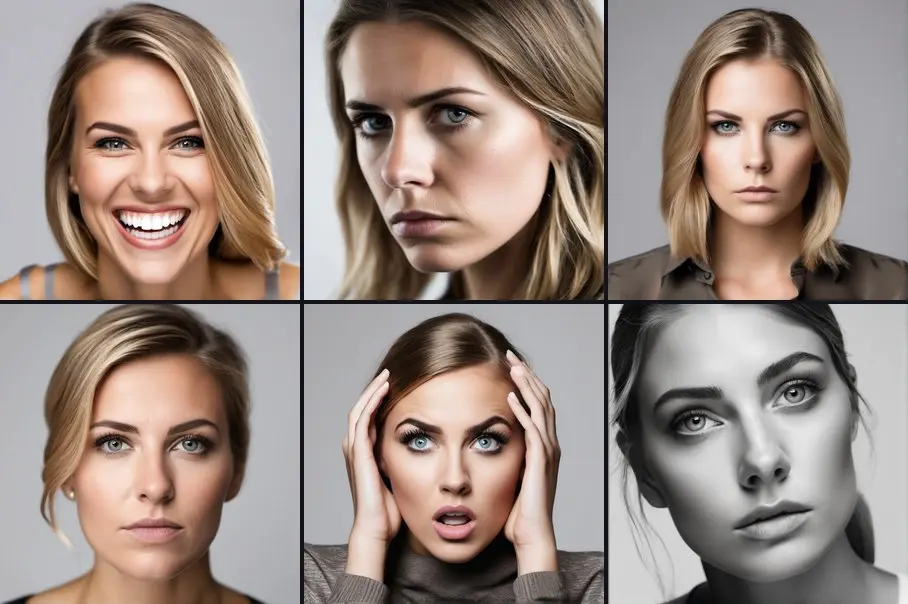
MorphCraft also includes a character expression tool that generates different emotional expressions from a single reference image.
Users can transform a neutral face into multiple emotional states such as:
- Happy
- Sad
- Serious
- Angry
- Surprised
- Thinking
The AI system analyzes facial features and adjusts them to match the selected emotional style.
This feature is particularly helpful for character design, digital storytelling, and visual content creation where multiple expressions are required.
Instead of creating multiple photos, users can generate a variety of expressions from a single image.
AI Upscale Technology
Another powerful capability of MorphCraft is image upscaling.
Upscaling improves the resolution and clarity of images that appear blurry or low quality.
The AI analyzes pixel patterns and reconstructs details that were previously lost. The result is a sharper, more refined image with improved resolution.
AI upscaling can be used for:
- Enhancing old photos
- Improving web graphics
- Preparing images for printing
- Increasing image clarity
This feature is especially useful when working with older media or compressed files.
Style Transfer
Style transfer allows users to apply artistic styles to their images.
The AI system analyzes the structure of the image and reinterprets it using different visual styles.
This feature can transform a regular image into an artistic or stylized version without manual editing.
Style transfer opens creative possibilities for:
- Digital art
- Social media visuals
- Creative marketing campaigns
- Graphic design projects
Users can experiment with different styles to produce unique visual results.
Background Removal
Background removal is another essential AI feature available in MorphCraft.
The tool automatically separates the main subject from the background of an image. This allows creators to place the subject in a different environment or use the image for design projects.
This feature is extremely valuable for:
- Product photography
- Marketing materials
- Website visuals
- Graphic design
Traditional background removal requires careful manual editing. MorphCraft automates the entire process using AI.
AI Workflows in MorphCraft
MorphCraft organizes its tools into structured workflows.
Instead of overwhelming users with complicated editing options, each workflow focuses on a specific creative task.
Examples of workflows include:
Face Swap
Video Face Swap
AI Upscale
Style Transfer
Background Removal
Each workflow follows the same simple upload-choose-download system.
This structured approach makes the platform accessible for beginners while still powerful enough for experienced creators.
User Experience and Platform Design
MorphCraft emphasizes a clean and modern interface.
The design focuses on simplicity, ensuring users can access features without navigating complicated menus.
The platform highlights several core sections including:
AI Image and Video Tools
Workflow demonstrations
Simple pricing plans
Free credit registration
Users are guided through the platform with clear instructions and easy navigation.
This user-friendly design helps reduce the learning curve often associated with creative software.
Free Credits for New Users
MorphCraft allows new users to explore the platform with free credits.
The platform provides 10 free credits when a user creates an account. These credits allow users to test different AI tools without requiring payment.
This free access encourages experimentation and helps users understand how the platform works before purchasing additional credits.
The registration process does not require a credit card, making it accessible for anyone who wants to explore the platform.
MorphCraft Pricing Structure
MorphCraft uses a credit-based pricing system instead of monthly subscriptions.
This flexible model allows users to pay only for what they use.
There are three main pricing tiers available.
Starter Pack
The Starter Pack is designed for beginners who want to explore the platform.
Price: $5
This plan provides:
- 100 credits
- $0.05 per credit
- Approximately 6 face swaps
- Around 32 image generations
The Starter Pack is ideal for casual creators who need occasional AI edits.
Popular Pack
The Popular Pack is the middle tier and offers more credits for frequent users.
Price: $20
This plan provides:
- 500 credits
- $0.04 per credit
- Approximately 33 face swaps
- Around 100 image generations
This plan is suitable for creators who regularly produce visual content.
Pro Pack
The Pro Pack is the largest package designed for heavy users and professionals.
Price: $50
This plan provides:
- 2,000 credits
- $0.025 per credit
- Approximately 133 face swaps
- Around 400 image generations
The Pro Pack offers the best value for creators who rely heavily on AI tools.
Benefits of MorphCraft’s Credit System
The credit system offers several advantages compared to subscription-based platforms.
First, users only pay for the features they actually use. There is no recurring monthly charge.
Second, credits provide flexibility. Users can distribute them across different tools depending on their project needs.
Third, the pricing structure makes the platform accessible for beginners who may not need frequent usage.
Who Can Benefit from MorphCraft?
MorphCraft is designed for a wide range of users.
Because the platform removes technical barriers, it can be used by beginners as well as experienced creators.
Below are some groups that can benefit from MorphCraft.
Content Creators
Content creators constantly need high-quality visuals for social media, videos, and marketing campaigns.
MorphCraft helps creators generate creative edits quickly without professional editing tools.
Digital Marketers
Marketing campaigns rely heavily on engaging visuals.
MorphCraft allows marketers to create unique images and videos that attract attention and improve audience engagement.
Designers
Graphic designers can use MorphCraft to experiment with visual ideas, generate character expressions, and transform images using AI style transfer.
Photographers
Photographers can use AI upscaling and background removal tools to enhance their photos quickly.
These features help improve image quality and streamline editing workflows.
Video Creators
Video creators can use MorphCraft’s video face swap technology to produce dynamic and creative visual content.
This tool allows creators to experiment with storytelling and visual transformation.
Advantages of Using MorphCraft
MorphCraft offers several advantages compared to traditional editing software.
Simplicity
The platform removes complicated editing processes and replaces them with simple workflows.
Users only need to upload content, choose a tool, and download the result.
Speed
AI processing allows MorphCraft to produce results within seconds.
This dramatically reduces editing time.
Accessibility
Users do not need professional editing skills to create high-quality visuals.
MorphCraft is designed for beginners and professionals alike.
Versatility
The platform combines multiple AI tools in one place, making it a complete creative environment.
The Future of AI Visual Creation
AI tools like MorphCraft represent the future of digital content creation.
As artificial intelligence continues to evolve, editing software will become increasingly automated.
Creators will focus more on creative ideas rather than technical editing tasks.
Platforms like MorphCraft make this transition possible by simplifying workflows and delivering powerful results through AI automation.
Getting Started with MorphCraft
Starting with MorphCraft is simple.
The basic steps include:
- Create a free account
- Receive 10 free credits
- Upload an image or video
- Choose an AI workflow
- Download the enhanced result
This quick process allows users to explore AI editing immediately.
Why MorphCraft Stands Out
MorphCraft stands out because it combines powerful AI technology with an easy-to-use interface.
Instead of overwhelming users with complex tools, the platform focuses on practical workflows that produce fast results.
The combination of image editing, video transformation, expression generation, and AI enhancement creates a versatile platform suitable for modern digital creators.
Conclusion
MorphCraft represents a new generation of AI-powered creative platforms. It simplifies the process of image and video editing by automating complex tasks with intelligent workflows.
With tools such as face swapping, video face swapping, expression generation, ai upscaling, style transfer, and background removal, MorphCraft allows users to transform rough visuals into professional content within seconds.
The platform’s three-step workflow, flexible credit system, and free starter credits make it accessible for creators of all skill levels.
As AI continues to reshape the creative industry, tools like MorphCraft will play a significant role in making high-quality visual production faster, easier, and more accessible than ever before.